


SimplyWise Cost Estimator
4.71.35K Reviews
App Specs
- Version
- 0.12.3
- Updated On
- License
- Free
- Downloads
- 500,000+
- Developer
- SimplyWise
- Categories
- Business
- Platform
- Android
Screenshots



 Analysis by AppCompare
If you're like me, always on the hunt for apps that make life a little smoother, then you’ll definitely want to hear about SimplyWise Cost Estimator. This app promises to be your go-to tool for managing and estimating costs, whether for personal use or small business projects. So, I decided to dive in and see what all the fuss is about.
Home repair costs are awkward to judge before anyone starts work. A quick mental sum can miss small purchases, while a spreadsheet takes time to build and maintain. I see the appeal of a dedicated estimator most clearly at that early decision point: when I want a rough plan before committing to a project, not a final quote that replaces a contractor’s inspection.
SimplyWise is a free business app from SimplyWise, with optional in-app purchases ranging from $4.99 to $119.99 per item. It is rated for Everyone, and its 4.7 average from around 10,000 ratings suggests many people find it useful. The key question for me is less whether it can replace every budgeting tool and more whether it helps me think through a repair without turning a simple task into bookkeeping.
Why a quick estimate can be useful
For a homeowner deciding whether to patch a damaged area, replace a fixture, or postpone a larger job, the first estimate is often about scale. A practical cost outline can help distinguish a manageable weekend task from a project that needs a professional assessment. That is the sort of uncertainty this app is aimed at reducing: it gives the planning process a structure before the shopping or calls begin.
I would treat any estimate as a working draft. Materials vary by size and quality, labor depends on the job and location, and a hidden problem can change the scope once work begins. The useful habit is to record what I know, mark what is still an assumption, and revisit the total when I have better information. A calculator can make the arithmetic easier, but it cannot inspect a wall or confirm a contractor’s quote.
First Impressions and User Interface
The first thing that struck me about SimplyWise Cost Estimator was its clean and intuitive design. When you open the app, you're greeted with a sleek interface that's easy on the eyes. It's clear that the developers put a lot of thought into the user experience, making navigation a breeze. You won't find yourself lost in a sea of options; everything is straightforward and accessible.
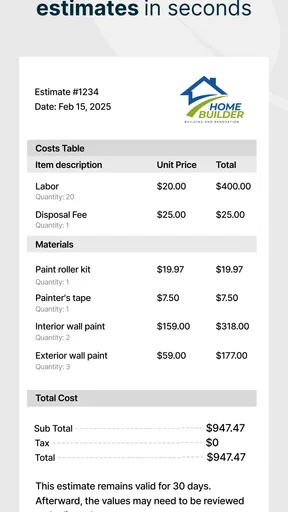
From the main dashboard, you can quickly jump into creating a new estimate. The app guides you through the process, ensuring you don’t miss any important details. I found the step-by-step approach particularly helpful, especially when dealing with complex projects.
Worth Reading Before You Choose

EA SPORTS FC Mobile 26 Is a Bigger Football Game, but It Takes Time

Flipboard Shows What News Apps Must Do Beyond the Feed

Switching to Android Auto Means Rethinking Your Driving Routine

Google Calendar Makes a Crowded Week Easier to Manage

Ludo King Makes the Most of the Minutes Between Plans

Baby Panda World Brings Quick Play to Modern Phones, but Its Game Library Feels Busy
One useful way to begin is to build an estimate around a single, clearly defined job rather than trying to plan an entire renovation in one sitting. For example, I would separate a bathroom refresh into its own estimate and keep a different one for a later flooring project. That makes it easier to see which decision is driving the total and to revise one plan without muddying the other.
Features That Stand Out
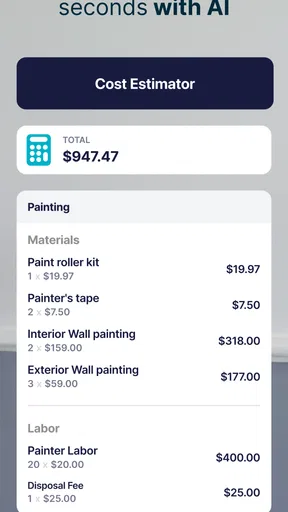
One of the standout features of SimplyWise is its comprehensive cost tracking. You can break down estimates into various categories and subcategories, which is perfect for detailed project planning. The app allows you to input costs for materials, labor, and other expenses, giving you a complete overview of your budget.
Another feature I appreciated is the ability to import and export data seamlessly. Whether you’re pulling in information from a spreadsheet or exporting your estimates to share with a team, SimplyWise has you covered. This functionality is a game-changer for anyone who needs to present their data in a professional format.
That spreadsheet connection is most valuable when it supports a workflow the user already has. I would keep supplier prices or measurements in a spreadsheet if that is where I collect them, then use the estimate to organize the project costs and share a clearer summary. Before relying on an import or export for an important handoff, I’d check a small sample first and make sure categories and totals appear as expected. That simple check can prevent a tidy-looking estimate from carrying a misplaced line item.
For a repair with uncertain scope, I would also avoid treating a single total as a promise. Keeping materials, labor, and other expenses distinct makes it easier to see what might change if I choose a different finish or discover extra work. The practical benefit is not just a number; it is being able to explain why the budget moved when one assumption changes.
For those of us who love visuals, the app also offers beautiful graphs and charts. These are not only aesthetically pleasing but incredibly useful for spotting trends and making informed decisions. It’s like having a financial analyst right in your pocket!
Charts are most helpful after the underlying entries are sensible. If I enter a broad guess for several unrelated items, a graph may look polished without making the plan more reliable. I would use the visual summary to compare the relative weight of categories, then return to the individual costs before deciding what to cut. That keeps presentation from being mistaken for precision.
Real-World Application
So, how does SimplyWise perform in the real world? I decided to test it out on a home renovation project I’m planning. By inputting all the expenses, I got a clear picture of the financial scope, which helped me adjust my plans accordingly. The app’s accuracy and attention to detail ensured I didn’t overlook any costs.
A realistic everyday case is a homeowner who notices a small leak and wants to plan the repair before visiting a store. I would list the likely materials, any paid labor, and related expenses as separate entries, then use the estimate to compare a basic repair with a more complete replacement. If a tradesperson later identifies a larger issue, I would revise the assumptions rather than treating the first figure as a binding quote. This makes the app useful for preparing questions and setting a spending range, not for diagnosing the problem.
Small business owners will find this app particularly beneficial. Whether you're planning a new product launch or managing operational expenses, SimplyWise keeps everything organized. You can easily compare estimates with actual costs, helping you stay on top of your financial game.
For a small business, a repair or improvement estimate can also help explain a purchase to someone else. I would use clear line items and keep the estimate focused on one decision, such as whether to repair a workspace feature now or budget for it later. It is less suited to full accounting: an estimate is a planning record, not a substitute for tracking every transaction, tax obligation, or cash-flow detail in a dedicated business system.
Compared with a notes app or a basic calculator, a purpose-built estimator offers a more organized place to group costs and review a project as a whole. A spreadsheet remains a stronger choice for users who want custom formulas, complex scenarios, or extensive forecasting. A contractor’s written quote is the better reference for confirmed labor and scope. I see this app between those options: more structured than jotting down numbers, but still dependent on the quality of the information I enter.
Who will get the most from it
I think it is a good fit for homeowners who want to prepare before shopping or requesting a quote, and for freelancers or small business owners who need a straightforward project-cost outline. It can also help someone comparing a few versions of a job, provided they keep the assumptions clear and update prices when they learn more. The app’s current version is 0.9.1, so I would keep expectations practical and make sure the workflow suits the way I prefer to plan before building a complicated process around it.
I would skip it if I needed a formal, binding construction quote, a detailed construction-management system, or accounting records that reconcile with business finances. It is also not the right answer when a repair involves safety concerns or damage that needs an expert inspection. In those situations, a qualified professional matters more than a neat estimate, and a spreadsheet or specialist software may be more appropriate for extensive planning.
Limits and Final Thoughts
After spending some quality time with SimplyWise Cost Estimator, I can confidently say it's a must-have tool for anyone looking to manage their expenses efficiently. The app’s user-friendly design, robust features, and adaptability to different projects make it a standout in the financial management space.
My enthusiasm comes with a boundary: an estimate is only as dependable as its inputs. Prices can change, labor may be difficult to predict, and a project can uncover work that was not visible at the start. I would use the app to organize an early plan and compare options, then confirm important figures with current supplier prices and professional advice before making a major commitment. That is a sensible trade-off for a convenient planning tool.
Whether you're a homeowner, freelancer, or small business owner, SimplyWise offers the tools you need to make informed financial decisions. Give it a try, and you might just find it becoming one of your essential apps for managing costs and staying organized.
It is free to get started, while in-app purchases are available for users who want to consider paid options. The app has 100K+ installs, and it is available for devices running OS 7.1 or later. For me, the best reason to try it is modest and practical: it can turn scattered repair-cost thoughts into a more organized estimate, as long as I remember that planning is not the same as a confirmed quote.
Ready to simplify your budgeting process? You can download SimplyWise Cost Estimator from your favorite app store and start taking control of your finances today!
Pros
- Intuitive interface for easy navigation.
- Quick setup with minimal personal info.
- Accurate cost predictions for projects.
- Supports multiple project types easily.
- Offers real-time updates and adjustments.
Cons
- Limited customization options for reports.
- Premium features require subscription.
- No offline access to the estimator.
- Limited integration with other apps.
- Occasional lag in data syncing.
FAQs for SimplyWise Cost Estimator
What is SimplyWise Cost Estimator used for?
SimplyWise Cost Estimator is designed to help users easily calculate and manage their expenses. Whether you're planning a renovation, budgeting for a project, or simply tracking daily expenses, this app provides detailed estimates and insights. It’s a valuable tool for both personal and professional financial management.
How accurate are the estimates provided by SimplyWise Cost Estimator?
The estimates generated by SimplyWise Cost Estimator are highly accurate, thanks to its sophisticated algorithms and up-to-date database of prices. However, users should note that actual costs may vary based on regional pricing and specific circumstances. Regular updates ensure the app remains a reliable resource for financial planning.
Is SimplyWise Cost Estimator available on both Android and iOS?
Yes, SimplyWise Cost Estimator is available for download on both Android and iOS platforms. Users can find the app on the Google Play Store and the Apple App Store. It’s designed to sync seamlessly across devices, ensuring you have access to your data wherever you are.
Does SimplyWise Cost Estimator offer integration with other financial apps?
SimplyWise Cost Estimator provides integration with several popular financial apps, allowing users to streamline their budgeting and expense tracking. This feature enhances the app’s functionality, making it easier to consolidate and manage financial data from different sources in one place.
Is there a cost associated with using SimplyWise Cost Estimator?
SimplyWise Cost Estimator offers a free version with essential features, but users can opt for a premium subscription to unlock advanced tools and features. The premium version includes enhanced data analytics, additional customization options, and priority customer support, offering great value for those requiring more comprehensive financial management.


